
State Previews on Story Links
Story links provide a lightweight way of referencing a story in another story. Simply copy the story ID, story URL, or comment URL and paste it into a description, comment, or tasks.
These story links now show you a visual preview of that story’s state.
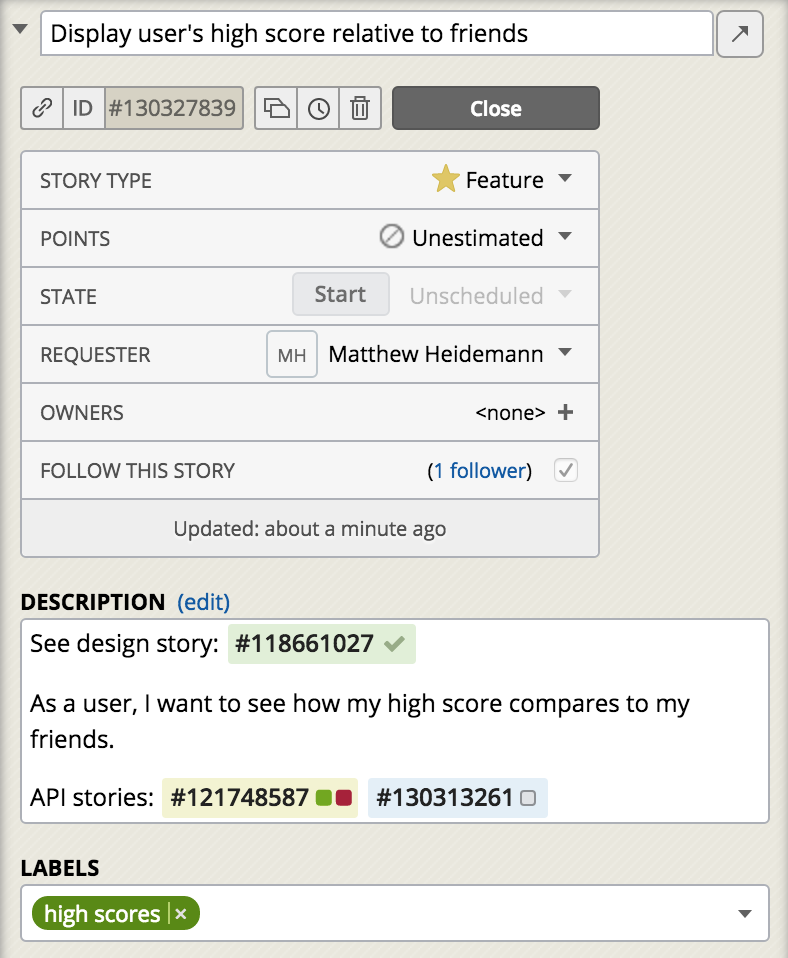
This provides a handy way of seeing the status of other stories this one may be dependent on, whether another story has been accepted or if it’s still frozen in the Icebox. As long as you have access to the story, you’ll see the state preview in the story details or story flyover.
These story links work across all your projects. If a story link is within a project or workspace, the story link will reflect updates to that story’s state immediately; if it’s outside a project or workspace, the new state will show when you reopened a story.
Got feedback? Please get in touch via the Provide Feedback widget under Help in any project, contact us on Twitter, or email us.
Originally published here.
Originally published by: Matt Heidemann.